
In today’s fast-paced digital landscape, the way users move through a website or application dictates their overall experience. A well-designed sequence of actions and responses, often referred to as web interaction flows, is crucial for user satisfaction and achieving business objectives. When these flows are seamless, users effortlessly complete tasks, find information, and feel in control. Conversely, clunky or confusing interactions can lead to frustration, abandonment, and a negative perception of a brand. Crafting these smooth digital pathways requires a thoughtful approach, focusing on user needs, clear communication, and continuous refinement.
Overview
- Seamless web interaction flows are essential for user satisfaction and successful online experiences.
- Understanding user needs through research is the foundational step in designing effective digital pathways.
- Mapping out interaction sequences helps visualize user journeys and identify potential friction points.
- Applying core design principles like feedback, consistency, and error prevention minimizes cognitive load.
- Iterative testing and gathering user feedback are vital for refining and improving existing web interaction flows.
- Accessibility plays a critical role in ensuring all users, including those in the US with varying abilities, can successfully interact with web content.
Understanding User Needs for Effective Web Interaction Flows
The journey to designing truly seamless web interaction flows begins with a deep empathy for the user. Before sketching a single wireframe or writing a line of code, it’s imperative to understand who the users are, what their goals are, and what pain points they currently face. This initial phase involves conducting thorough user research, which might include interviews, surveys, and usability studies. Creating user personas—fictional representations of target users based on real data—helps designers keep user motivations and behaviors at the forefront. Additionally, mapping out user stories, which describe a user’s goal from their perspective, provides valuable context for each interaction. By putting ourselves in the user’s shoes, we can anticipate their questions, predict their actions, and design flows that naturally guide them toward their objectives, rather than forcing them down a predefined path. This foundational understanding prevents common design pitfalls and ensures that the eventual flow feels intuitive and aligned with genuine human behavior.
Structuring and Mapping Web Interaction Flows for Clarity
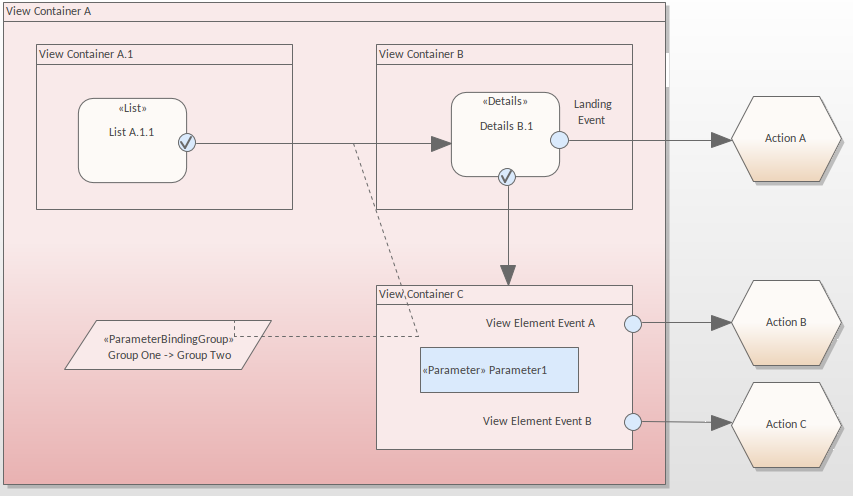
Once user needs are clearly understood, the next step involves structuring and visually mapping out the web interaction flows. This process typically uses flowcharts or user journey maps to illustrate every step a user might take, from an entry point (e.g., clicking a link, opening an app) to a successful completion of a task. It’s important to define all possible paths, including the “happy path” where everything goes as planned, as well as alternative paths, error states, and decision points. Tools ranging from simple whiteboards to specialized software can help visualize these sequences. Each node in the flow should represent a distinct user action or system response, with clear labels and connections showing the sequence. Attention to consistency in terminology, visual cues, and layout across different screens or stages of the flow is paramount. A well-structured flow map acts as a blueprint, helping designers identify logical gaps, redundant steps, or moments where users might become confused, allowing for proactive adjustments before development begins.
Implementing Core Principles in Web Interaction Flows
Successful web interaction flows are built upon a set of core design principles that prioritize usability and user satisfaction. One fundamental principle is to provide clear and immediate feedback for every user action. Whether it’s a visual change, an animation, or a brief message, users need to know that their input has been received and what the system is doing in response. Consistency is another critical element; users expect similar interactions to behave in similar ways across different parts of a website or application. This reduces cognitive load and makes the interface feel predictable. Error prevention is also key; the best flows guide users away from mistakes before they happen, but when errors do occur, effective error recovery mechanisms should be in place, offering clear instructions on how to fix the issue. Minimizing friction means streamlining processes, reducing the number of steps required, and ensuring that each interaction serves a clear purpose. Thoughtful microinteractions, small animated details, can also significantly contribute to the perceived smoothness and enjoyability of these flows, making them more engaging and less utilitarian.
Iterative Testing and Refinement of Web Interaction Flows
Designing seamless web interaction flows is not a one-time event; it’s an ongoing process of testing, learning, and refining. Once initial flows are mocked up or prototyped, they must be put to the test with real users. Usability testing, whether moderated or unmoderated, provides invaluable insights into how people actually interact with the design. Observing users attempting to complete tasks can reveal hidden pain points, unexpected behaviors, and areas where the flow breaks down. A/B testing can help compare different versions of an interaction to see which performs better against specific metrics. Analytics data, such as drop-off rates at certain stages of a form or task, can pinpoint problematic areas. Furthermore, direct user feedback through surveys or interviews can offer qualitative perspectives. Based on these insights, designers can iterate on the flows, making adjustments to improve clarity, reduce friction, and enhance the overall user experience. This continuous loop of design, testing, and refinement ensures that web interaction flows remain effective and user-friendly over time, adapting to changing user expectations and technological advancements.